 Appmost
Native app design builder for iOS and Android
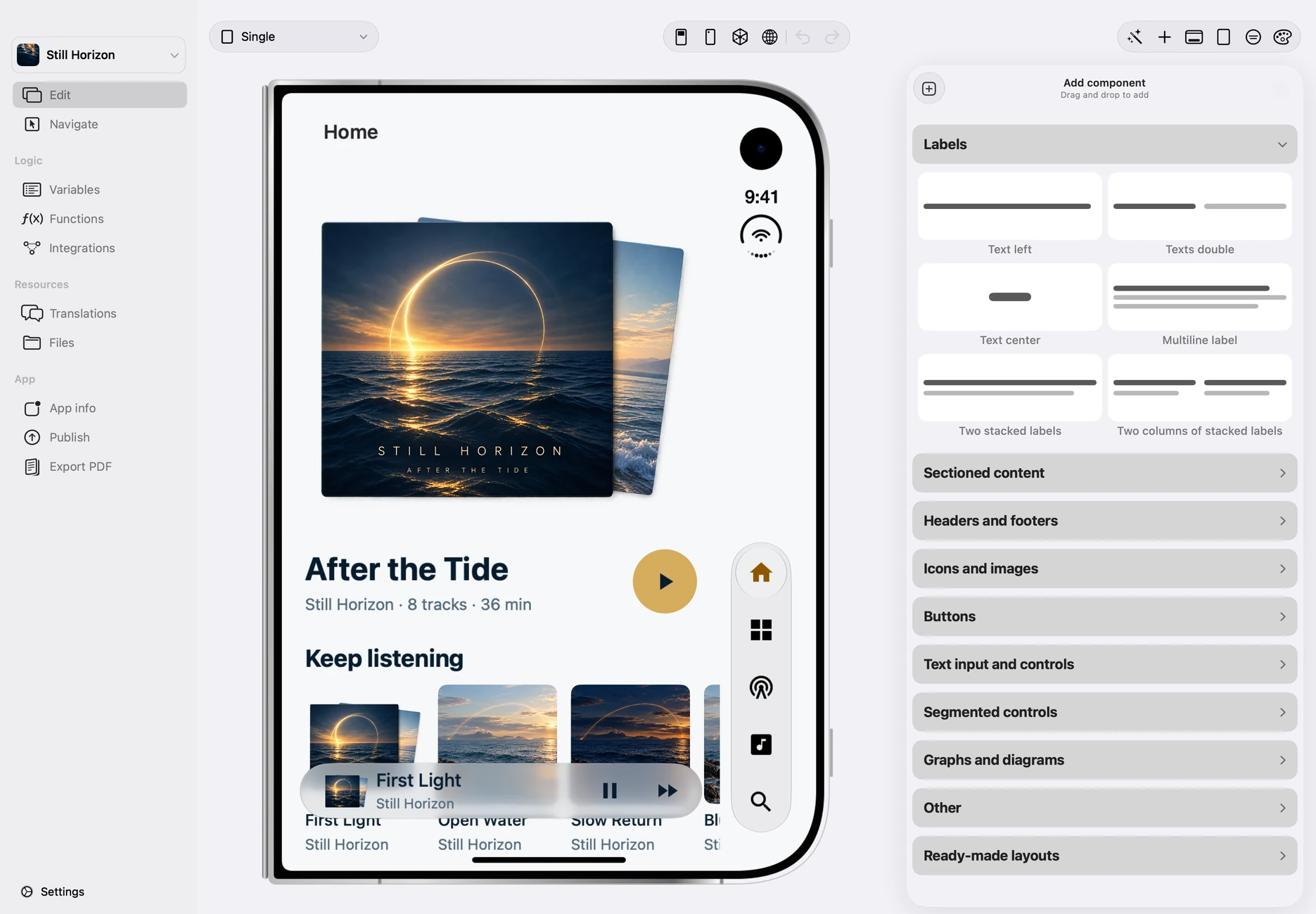
Native app design needs more than a canvas of static screens. Appmost keeps the design inside the app project, so an AI agent can create screens, edit structure, and review the result in the same live preview that leads toward iOS and Android builds.
Short answer
Use Appmost as a native app design builder when you want AI-assisted iOS and Android screens that remain editable as an app project. Describe the product, screen set, navigation, data states, and platform expectations; let an AI agent create the first version; then inspect the live native preview before deciding whether the work is still a mockup, ready for a flow prototype, or mature enough for build planning.
What native app design has to preserve
A native app design is not only the visual layer. It carries navigation, state, repeated controls, platform expectations, and the decisions that later affect signing, testing, and store delivery. If the design lives only as an exported image, the next step often starts from scratch. If it lives inside the app project, each design pass can become part of the build path.
Appmost is built around that second model. The project is the source of truth. A compatible AI agent connects through local MCP, edits the open project, and uses the preview to check the real screen structure. That makes the design review more concrete: the question is not only whether a screen looks good, but whether it belongs in the app.
Design builder, mockup tool, and prototype generator
The best starting point depends on the decision you need to make. A design builder should shape the overall native app direction. A mockup tool should make a small screen set easy to review. A prototype workflow should test whether a person can move through the main journey.
| Workflow | Use it when | Related Appmost page |
|---|---|---|
| Native app design builder | You need the app's screen system, navigation, and repeated patterns to take shape inside one editable project. | This page |
| Mobile app mockup | You need a compact visual screen set for early stakeholder review. | Mobile app mockup tool |
| AI app prototype | You need to review the main journey, not only individual screens. | AI app prototype generator workflow |
| App flow review | You need to find dead ends, missing back paths, overloaded branches, and build-readiness gaps. | App flow visualizer |
Prompt examples for native app design
A useful prompt gives the agent enough product shape to avoid generic screens. Name the app category, user type, required surfaces, primary action, platform constraints, and what should stay out of scope for the first pass.
Marketplace app: Design a native iOS and Android app for a local service marketplace. Include home, search results, provider detail, quote request, booking confirmation, messages, saved providers, and account settings. Keep the design practical for repeat booking, not marketing-heavy.
Operations app: Create a native app design for warehouse supervisors reviewing daily exceptions. Include shift overview, exception detail, photo evidence, assignment, comment thread, resolved state, and summary. Prioritize dense scanning without tiny tap targets.
Health habit app: Build a calm mobile app direction for people tracking medication and daily symptoms. Include today, medication detail, reminder settings, symptom log, trend summary, and export. Avoid gamified streak pressure.
Creator tool: Design an app for short-form video creators planning shoots. Include project list, shot checklist, location note, asset upload, approval, and publish status. Use clear states for draft, ready, and blocked work.
A practical Appmost workflow
Treat the AI-generated result as the first design material, not the finished product. The value comes from quick creation plus careful review: checking hierarchy, state coverage, native constraints, and whether the same patterns repeat consistently across screens.
- Define the app surface. List the screens, repeated components, user roles, and states the first design pass must include.
- Connect the AI agent locally. Use Appmost's local MCP server so the agent can work with the open project instead of a detached prompt.
- Create the first native direction. Ask for screens that use app controls, mobile navigation, realistic content, and platform-appropriate density.
- Review in the live preview. Inspect the screen set as an app, checking small labels, repeated rows, navigation, empty states, and visual hierarchy.
- Decide the next depth. Keep editing visual direction, move into a prototype review, or start build planning once the structure is credible.
What to check before a design review
Native app design reviews fail when they only judge the hero screen. Before sharing, check the repeated parts of the app. They reveal whether the design can survive real content and multiple product states.
Navigation
Every major screen needs an obvious route in and out. Back paths, tabs, modals, and detail views should feel intentional.
State coverage
Show loading, empty, error, saved, pending, and completed states where they affect the main user decision.
Platform fit
Check tap target size, bottom controls, scroll behavior, keyboard-heavy screens, and dense rows before calling the design native.
Build readiness
Mark what still needs data, authentication, uploads, signing, or store delivery so design approval does not imply engineering is done.
Common mistakes
- Asking for an app without naming the workflow. A vague prompt usually produces a polished dashboard, not a native mobile product direction.
- Skipping secondary states. The first version should include enough empty, error, and detail states to expose weak structure.
- Mixing design review with release promises. A good design pass can prepare for builds, but it does not replace signing, platform checks, or the TestFlight upload workflow.
- Reviewing screenshots instead of the project. Screenshots are useful for comments, but the source project is where the design should keep improving.
- Letting every screen become a card grid. Native apps need task-specific controls, forms, lists, and navigation patterns, not repeated decorative panels.
When Appmost is the right fit
Appmost fits teams that want native app design to stay close to implementation: founders shaping a first product, agencies turning a brief into a reviewable app direction, and product teams using AI agents to speed up screen creation while keeping visual control. It is especially useful when the same project may later need prototype review, iOS builds, Android builds, or handoff to a technical team.
Use a dedicated design-system tool when the main job is maintaining a shared component library across a large design organization. Use a code-first spike when the hardest question is a device API or backend integration. Use Appmost when the first hard question is the native app shape: what screens exist, how they relate, and whether the design can become a real project instead of a disposable picture.