 Appmost
AI app prototype generator workflow
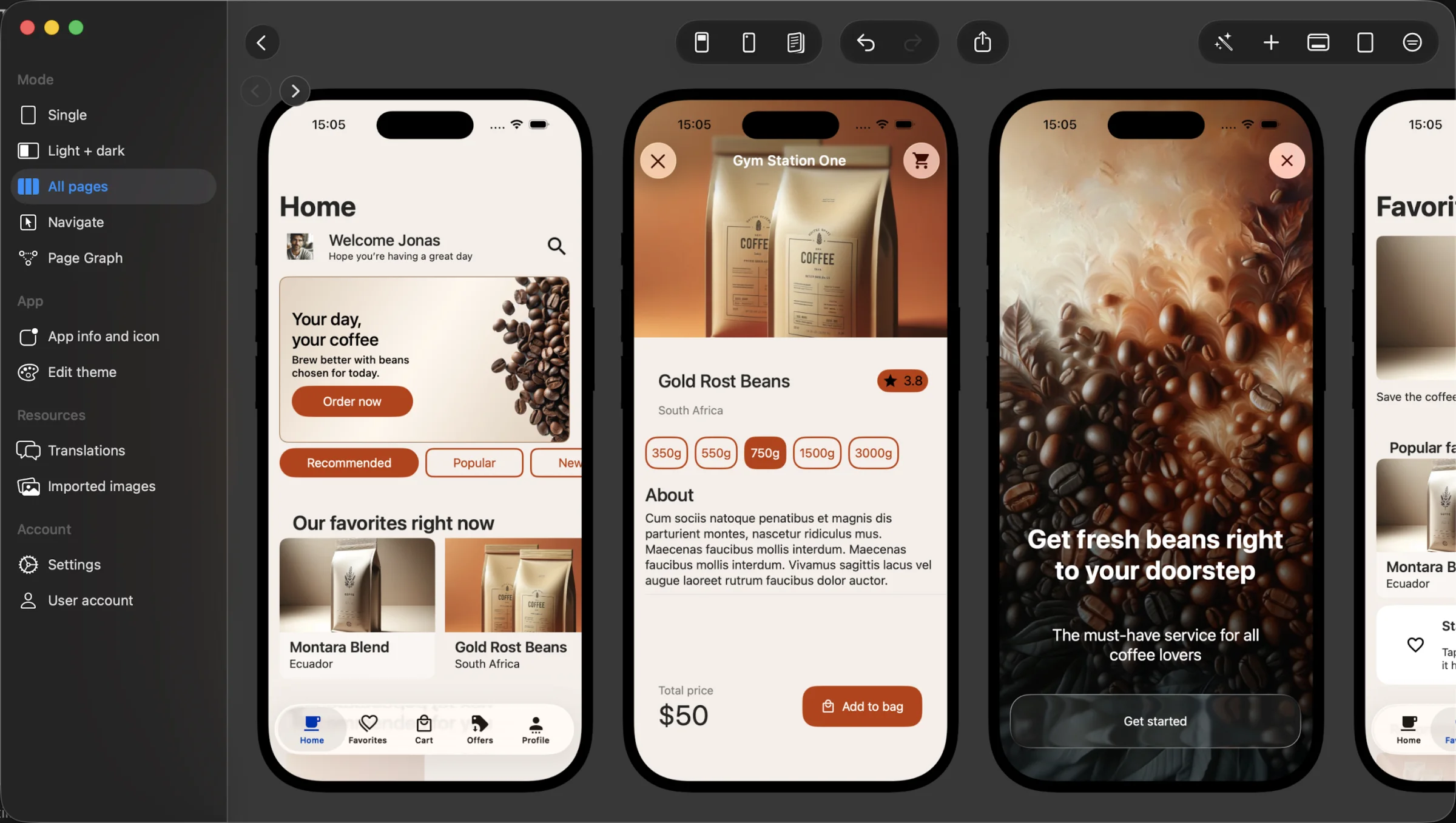
An AI app prototype generator is useful when it gives you something specific to judge: screens, navigation, state, and product assumptions. Appmost keeps that work in the native app project so a prototype can become a build plan instead of a disconnected set of pictures.
Short answer
Use Appmost as an AI app prototype generator when you need a first mobile app direction with editable screens, a visible flow, and a path toward native iOS and Android builds. Start with one user journey, prompt the agent for the screen set, review the flow in Appmost, remove weak paths, then decide whether the project needs another design pass, user review, or build preparation.
What the first prototype should prove
The first prototype should not try to prove that the whole product is final. It should answer a smaller set of questions: does the idea have a clear entry point, does the main task fit on mobile screens, and can someone understand the journey without a long explanation? If the answer is no, code will not fix the problem. The prototype needs a sharper structure.
Appmost is built for that middle step between a prompt and a real app. Your agent can work inside the project, Appmost renders the result, and you can keep reviewing the actual app structure instead of exporting static screenshots into another tool. That matters when the prototype is meant to become installable software later.
Start with one journey
A broad prompt like "make a marketplace app" usually creates a collection of plausible screens with no strong product logic. Choose one journey first: onboarding, booking a service, creating a listing, reviewing analytics, tracking a habit, or upgrading a subscription. The journey should include a start, one main task, one decision point, and a useful end state.
For a service marketplace, the first journey might be search, provider detail, quote request, date selection, and confirmation. For a team operations app, it might be job list, job detail, photo note, supervisor review, and submitted state. A focused journey gives the agent constraints and gives reviewers something concrete to test.
Prompt examples for reviewable prototypes
Good prompts name the app category, audience, main screens, interaction depth, and visual tone. They also say what should not dominate the result. If you need an app flow, say that the output should be mobile app screens, not a landing page, pitch deck, or generic dashboard.
Subscription planning app: Create a mobile app prototype for freelancers who track recurring subscriptions. Include onboarding, monthly overview, subscription detail, renewal alert, add subscription, and settings. Keep it calm and easy to scan.
Local service booking: Generate an iPhone app flow for booking home services. Include search, provider profile, quote request, date selection, confirmation, and saved providers. Focus on tap-by-tap mobile screens.
Clinic check-in: Create a mobile prototype for patient check-in at a small clinic. Include identity confirmation, appointment details, symptoms form, insurance card capture, queue status, and help. Prioritize clarity and low-stress screens.
Field team reporting: Design a mobile prototype for field teams reporting daily work. Include job list, job detail, photo note, materials used, supervisor review, and submitted state. Use a durable work-tool style.
A practical Appmost workflow
Treat the first generation as a structured draft. The useful work comes after that: remove unnecessary paths, tighten labels, add missing states, and make sure the screen order still matches the task. Keep the review close to behavior, not only appearance.
- Write the journey before generating. List the five to eight screens that matter for the first review.
- Prompt the agent inside the Appmost workflow. Give the agent the app category, audience, screen list, and constraints.
- Review the native preview. Walk the main path and mark every screen where the next action is unclear.
- Check the structure. Look for dead ends, missing back paths, repeated screens, and side branches that make the product harder to explain.
- Choose the next artifact. If the idea is still moving, do another prototype pass. If the flow is stable, prepare review assets or build planning.
What to check before sharing
A prototype is easier to review when accidental generated noise is removed first. Before recording a walkthrough, sending screenshots, or asking for stakeholder input, run a compact quality pass across the whole journey.
Entry point
The first screen should make the user's job clear. If it opens with a vague overview, move the task-specific path earlier.
Main action
Every screen in the core journey should have one obvious next action. Competing buttons usually mean the screen needs another pass.
Missing states
Check empty lists, loading moments, permission requests, failed uploads, and confirmations. These states make the prototype testable.
Navigation
Confirm that back paths, secondary actions, and review loops do not leave people trapped or unsure.
Prototype depth: mockup, flow, or build plan
Different teams use the word prototype for different artifacts. A visual mockup answers what the app might look like. A flow prototype answers how screens connect. A build plan answers what needs to exist before the app can be tested on a device. Name the depth before you start so the review does not drift.
| Depth | Best question | Appmost workflow |
|---|---|---|
| Screen mockup | Does the first direction communicate the product? | Generate the first screen set and edit hierarchy, labels, and visual tone. |
| Flow prototype | Can someone complete the core journey? | Review connected screens, dead ends, back paths, and missing states. |
| Review package | Can stakeholders compare decisions quickly? | Use the cleaned flow for screenshots, walkthroughs, or design discussion. |
| Build plan | What must be real before device testing? | Separate screen work from logic, data, signing, and release preparation. |
Run a five-minute review script
Before a wider review, ask one person to walk through the prototype without explaining the intended design. Ask what they think the app does, what they would tap next, and where they feel unsure. Do not correct them during the walkthrough. The value is in hearing where the prototype fails without narration.
Then compare their path with the flow you expected. If they miss the main action, rename it or move it earlier. If they skip an important screen, check whether that screen is actually needed. If they understand the idea but cannot complete the task, the prototype needs a flow pass rather than more visual polish.
Common mistakes
- Prompting for the whole company. Ask for a mobile journey, not a website, pitch deck, brand system, and roadmap at once.
- Keeping every generated screen. AI can create extra screens that look plausible but do not help the task.
- Skipping edge states. Empty, loading, permission, error, and confirmation states often decide whether a mobile app feels real.
- Reviewing only still images. Static screenshots hide broken paths. Walk the flow before choosing a direction.
- Confusing polish with readiness. A clean first screen does not mean the app is ready for build planning.
When to choose another method
Use a dedicated design-system workflow when the product already has mature components, strict brand governance, and many designers collaborating on shared libraries. Use code-first prototyping when the hard question is technical feasibility, device APIs, live data, or performance. Use Appmost earlier, when the work is still about app shape: what screens exist, how they connect, and which direction is worth testing.
For founders, this is useful before paying for a full design or engineering sprint. For product teams, it is useful before a roadmap conversation or stakeholder review. For agencies, it is useful when a client needs to compare two mobile directions without turning the first week into a blank-canvas design phase.